
A quiet UPS scan usually means one of three things: the package is moving between scan points, the service level naturally allows longer visibility gaps, or something real has interrupted the shipment. The mistake is treating those three situations the same. People either panic too early on a normal Ground move or wait too long on a shipment that has already missed its delivery promise.
The useful question is not “why is tracking quiet?” It is “is this still inside a normal window, or has it crossed into a support problem?” That is the decision this page is built to answer.
| Tracking pattern | What it usually means | Best next step |
|---|---|---|
| On the Way, ETA not missed yet | Usually a normal hub-to-hub gap | Wait, then recheck the full history and My Choice before escalating |
| Exception with a detail message | A known delay or address problem is already logged | Read the exception detail first, then decide whether support is actually needed |
| Delivery date passed and still no movement | The public page may have reached its limit | Contact UPS or ask the shipper to start a trace |
| Delivered but no package found | Misdelivery, theft, or a bad delivery assumption | Do not use this guide as your first move; follow the delivered-but-missing path |
| Failed attempt or notice left | The package may already be waiting at a pickup or redirect step | Check the notice and alternate delivery options before assuming it is lost |
When a quiet UPS scan is still normal
A silent tracking page is normal more often than people think. UPS scans are event-based, not live GPS pings, so a package can move for hours between hub events with nothing new showing publicly.
That is why On the Way does not mean live visibility. It means the shipment is still inside the network. If the page shows an exception instead of a quiet gap, this explanation of what a delivery exception usually means is the better branch to read next.
Ground shipments feel worse because the service window is wider. A package that goes quiet on a Friday night can easily stay quiet through the weekend and still be fine. If the silence lines up with a long weekend or service interruption, our guide on how UPS holiday schedules slow scans and deliveries is often more useful than jumping straight into claims.
How long different UPS services can stay quiet
UPS does not publish one universal panic threshold. What it does publish are service windows, tracking-status definitions, claim rules, and support flows. The most useful way to read a quiet package is as a practical timing model, not a single magic number.
| Service type | Quiet period that can still be normal | Point where support becomes reasonable | Why |
|---|---|---|---|
| UPS Ground | About 24 to 72 hours can still be normal | Once the delivery date is missed and the scan history stays dead | Ground has the widest transit window and the longest natural hub-to-hub gaps |
| Next Day Air | Usually much shorter gaps than Ground | The same day if the delivery commitment is missed | Air services are sold on speed, so a missed commitment matters fast |
| 2nd Day Air and 3 Day Select | Longer than Next Day Air, still tighter than Ground | Within the next business day after the promised date slips | These shipments should show progress more quickly than Ground |
| International | Longer if customs, duties, or broker review are involved | When the page points to customs but no document or payment issue is clear | Customs delay is not the same problem as a lost domestic package |
The exact hour count matters less than the pattern. A clean hub scan with a still-valid ETA is usually a waiting problem. A missed ETA with nothing after it is a support problem. If the route still makes sense, think “trace.” If the shipment is confirmed damaged, missing contents, or unrecoverable, think “claim.”
When to stop waiting and ask for help
Stop waiting once the shipment has crossed from normal silence into broken expectations. That usually means one of these patterns:
- The delivery date has passed and there is still no meaningful new movement.
- The page shows an exception, but the detail message does not resolve and no follow-up event appears by the next business day.
- The package was out for delivery, never arrived, and the tracking history still looks frozen the day after.
- The last scan is stuck at one facility long enough that the route no longer feels plausible.
At that point the public tracking page stops being enough. UPS support can usually see more than the consumer-facing page shows.
If you need a person instead of another chatbot loop, the guide to reaching a live person at UPS is the better companion page at this stage.
What to check before you contact UPS
Do a fast evidence pass before you call or open anything. That makes the case cleaner and can save you from escalating the wrong problem.
Read the full status history, not just the latest line
People fixate on the newest scan and miss the useful clue three lines lower. Address corrections, failed delivery attempts, and exception details often sit lower in the history than the bold top line.
Check UPS My Choice and alternate delivery options
UPS My Choice can show delivery windows, delivery-change options, and proof-of-delivery features that help resolve confusion without a claim. If the page shows a failed attempt or redirect, check whether the package was rerouted to an Access Point or held for pickup.
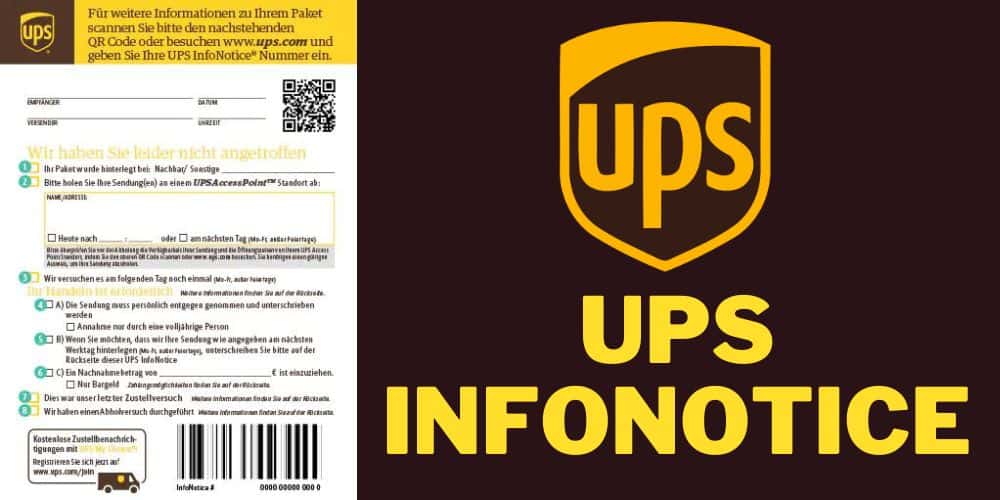
If the driver left a notice, our walkthrough of what a UPS InfoNotice usually means is more useful than repeatedly refreshing the same tracking page.
Make sure you are not in a different workflow entirely
If the shipment says Delivered and the box is not there, this is no longer a “quiet tracking” problem. Start with the wrong-address recovery steps or the delivered-but-missing flow, not the trace logic on this page.
Trace vs. claim: which lane applies
A trace and a claim are not the same thing, and using the wrong one wastes time.
A trace is for a package that might still be found
A trace is the smarter first move when the shipment is overdue, the route still looks plausible, and you think UPS may still recover it. You are asking UPS to investigate the package’s location inside the network rather than declaring it lost on day one.
A claim is for a package that is lost, damaged, or missing contents
UPS’s current claims guidance says lost or damaged package claims should be started within 60 days of the scheduled delivery date. That is a real deadline, not a suggestion.
If a merchant created the label under its UPS account, the shipper often has more control over the claim path than the recipient does. If you bought something online, the fastest route may be to make the seller handle the trace or claim while they replace or refund the order under their own policy.
What UPS support can usually do before a claim
UPS support can review the record in more detail, help confirm whether the shipment still looks recoverable, and point you toward the right claim lane if it does not.
What documents UPS usually wants
UPS’s supporting-documents guidance is more specific than most search results suggest. For a clean claim, have the evidence pack ready before you upload anything.
| Document | Why it matters | Common failure point |
|---|---|---|
| Tracking number | Connects the claim to the shipment record | Recipients often need the seller's order email to recover it |
| Proof of value | Shows what the item was worth | People upload a screenshot but not the invoice or purchase record |
| Shipping-charge proof | Needed if you want shipping costs considered | The payment proof does not always match the label owner |
| Photos for damage claims | UPS may require damage evidence and package condition photos | People throw away the box too early |
| Declared value context | Affects the reimbursement ceiling when declared value was added | Buyers assume retail value and declared value are automatically the same |
Keep the packaging until the case is closed. It is one of the easiest places to ruin a good damage claim.
When this guide is the wrong fit
This page is not the right first read for every UPS problem.
- If the package says Delivered but you cannot find it, treat it as a delivery-location problem first.
- If the shipment is clearly in customs, do not use domestic lost-package logic on it.
- If a failed delivery attempt left a notice or Access Point redirect, follow that operational path first.
- If the merchant controls the label and the account, you may get farther by pushing the merchant to act than by trying to outwork them from the recipient side.
That last point is the one competitors avoid saying because it sounds inconvenient. It is still true.
What this update adds
For this update, I compared the current UPS pages for tracking support, tracking-status definitions, claim filing, claim documents, and UPS My Choice. The goal was not to rewrite UPS’s help center. It was to map the fastest decision path for a person staring at a quiet scan and wondering whether to wait, trace, or claim.
Three details matter more than most generic pages admit:
- UPS separates “find my package” from “file a claim” more clearly than many blog posts do.
- UPS My Choice is more useful than generic advice suggests because it can expose delivery details and change options that resolve the problem earlier.
- The most expensive mistake is choosing the wrong lane and building the wrong evidence pack for the actual problem.
FAQ
Why is my UPS tracking not updating?
Usually because the package is between scan points, moving on a service with naturally wider visibility gaps, or sitting inside an exception workflow that has not produced a new public event yet. The key question is whether the expected delivery promise has actually broken.
How long can UPS go without a scan?
Ground shipments can stay quiet longer than Air services, especially across weekends or long hub-to-hub moves. The missed delivery date matters more than the raw hour count.
What does “Exception” mean in UPS tracking?
It means UPS has logged an interruption to normal movement, such as a weather issue, address problem, or failed delivery attempt. Read the detail line before you decide whether the shipment is actually lost.
When should I contact UPS support?
Contact support when the delivery date has passed and the page still looks dead, when an exception remains unresolved into the next business day, or when the route no longer makes sense and the public tracking page has stopped being useful.
When should I request a package trace?
Request a trace when the package is late enough that you no longer think it is inside a normal scan gap, but you still think recovery is possible. That is the right middle ground before a formal claim.
How long do I have to file a UPS claim?
UPS says lost or damaged package claims should be started within 60 days of the scheduled delivery date.
Can the recipient file the claim, or does the shipper need to do it?
Sometimes the recipient can act, but the shipper often has more control when the label was created on the shipper’s UPS account. In ecommerce orders, the seller may still be the fastest path.
Does UPS My Choice show more detail than normal tracking?
Often yes. UPS promotes My Choice for delivery windows, delivery changes, and proof-of-delivery features that can answer questions the generic public page does not resolve on its own.
This update was last checked against current UPS U.S. tracking support, tracking-status, file-a-claim, supporting-documents, and UPS My Choice pages on April 2, 2026.